Online Help Help Center home page
  1. Online Help
  2. Domain Management
  3. Domain Forwarding

Articles in this section

  • Dashboard and redirection types
  • Redirect Domain To Another Website
  • Adding a Global Redirect
  • Editing a domain redirection
  • Deleting a domain redirect
  • Redirecting your domain

Editing a domain redirection

  • October 10, 2018 14:53
  1. Click Edit to change the current URL for domain redirection.

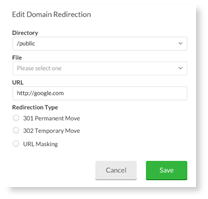
  2. After selecting Edit, you will be prompted to change your selections (i.e. directory, file, URL and redirection type).


Was this article helpful?
1 out of 11 found this helpful
Return to top

Related articles

  • Redirecting your domain
  • Deleting a domain redirect
  • Dashboard and redirection types
  • Adding a Global Redirect
  • Redirect Domain To Another Website
Български
Dansk
Deutsch
Ελληνικά
Español
Español (México)
Français (Canada)
Français (France)
Hrvatski
Magyar
Italiano
Norsk
Português
Português do Brasil
Română
Shqip