Online Help Help Center home page
  1. Online Help
  2. Utilities
  3. PHP Manager

Articles in this section

  • Restoring PHP .INI Settings
  • Uploading a PHP.ini file
  • Choosing basic PHP Settings
  • Selecting a PHP Version
  • FAQ

Choosing basic PHP Settings

  • November 19, 2019 19:55
  • Updated

1. Select the version from the drop-down menu under "PHP Version". 

2. Next, select the boxes and choose file sizes and execution time.
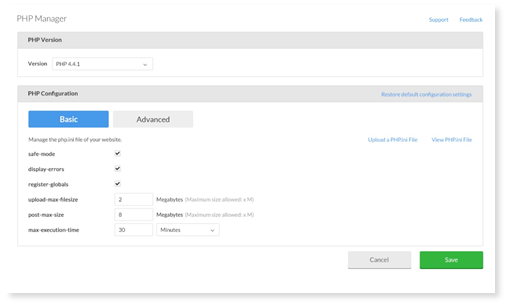


3. Select Save when you are finished configuring your basic settings.


Was this article helpful?
1 out of 8 found this helpful
Return to top

Related articles

  • Selecting a PHP Version
  • FAQ
  • Uploading a PHP.ini file
  • Restoring PHP .INI Settings
  • DNS record types
Български
Dansk
Deutsch
Ελληνικά
Español
Español (México)
Français (Canada)
Français (France)
Hrvatski
Magyar
Italiano
Norsk
Português
Português do Brasil
Română
Shqip