Online Help Help Center home page
  1. Online Help
  2. Utilities
  3. PHP Manager

Articles in this section

  • Restoring PHP .INI Settings
  • Uploading a PHP.ini file
  • Choosing basic PHP Settings
  • Selecting a PHP Version
  • FAQ

Uploading a PHP.ini file

  • April 07, 2020 00:28
  • Updated
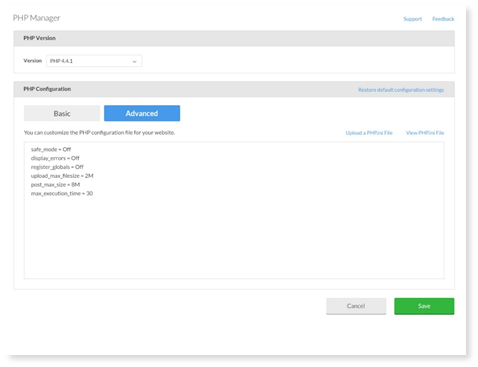
  1. Select Upload a PHP.ini file and select a file from your computer. 

  2. To view, download, or re-upload the php.ini file, select View php.ini. 

Was this article helpful?
0 out of 5 found this helpful
Return to top

Related articles

  • Choosing basic PHP Settings
  • Restoring PHP .INI Settings
  • Upload a file or directory
  • Selecting a PHP Version
  • Exploring the Admin Interface
Български
Dansk
Deutsch
Ελληνικά
Español
Español (México)
Français (Canada)
Français (France)
Hrvatski
Magyar
Italiano
Norsk
Português
Português do Brasil
Română
Shqip